Ransomware: the first ten minutes
Ransomware spreads through the network in minutes. The person who notices first decides how bad it gets. Learn the signs and the four moves.
What ransomware is
Ransomware is a program that scrambles (encrypts) every file it can reach, on the computer it landed on and on any shared drive or synced folder that computer can see, then leaves a note demanding payment for the key. Modern gangs also copy the files first and threaten to publish them, so a good backup alone does not end the problem.
It gets in the usual ways: an attachment that asked you to “enable content”, a link to a fake download, a stolen password used to log in remotely, or an unpatched device. Everything in lessons 2 to 5 is ransomware prevention. This lesson is about what to do when prevention fails.
IBM’s four-minute explainer shows how an attack unfolds and why backups decide the outcome.
The early signs
Ransomware does not announce itself first. It works for a few minutes before the note appears. If you notice any of these, act immediately:
| Sign | What is happening |
|---|---|
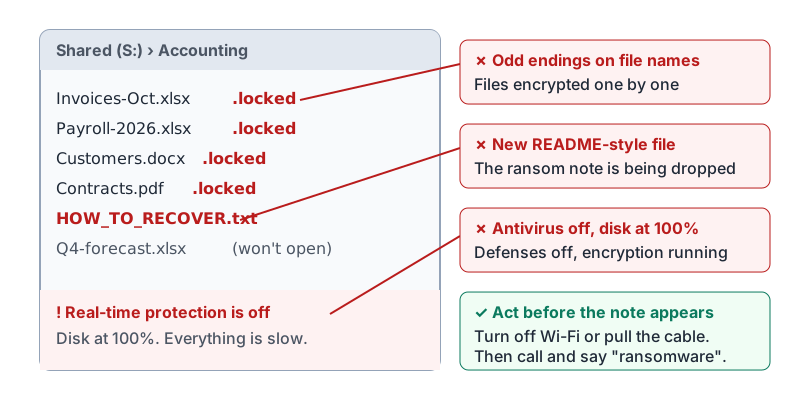
File names change to odd endings (.locked, .crypt, random letters) |
Files are being encrypted one by one |
| Documents will not open, or open as gibberish | Already encrypted |
New text or HTML files appear in folders with names like HOW_TO_RECOVER or README |
The ransom note is being dropped |
| The computer slows to a crawl and the disk light stays on | Encryption is running |
| Desktop background changes to a message | The attack is finishing |
| Antivirus turns itself off or will not open | Malware is disabling defenses |
| A shared folder shows the same symptoms on another person’s computer | It has spread. Everyone needs to know now. |
What a shared folder looks like in the minutes before the ransom note appears.
The four moves
Memorize these in order. They are the same whether you are the owner or the newest hire.
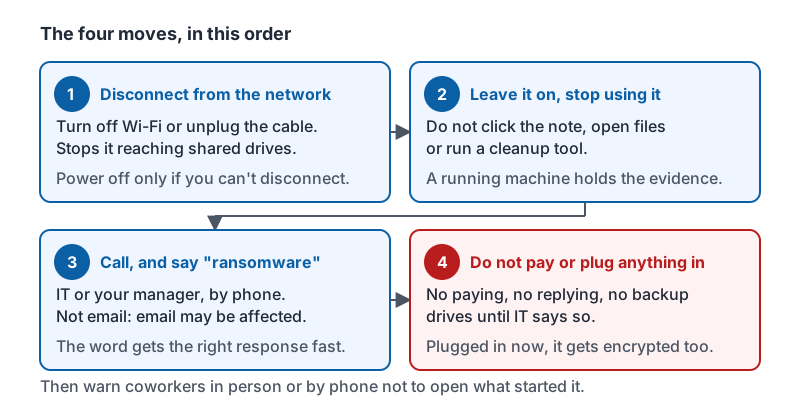
- Disconnect the device from the network. Turn off Wi-Fi or unplug the network cable. This stops it reaching shared drives and other computers. If you cannot disconnect it, powering it off is the fallback, not the first choice.
- Leave it on and stop using it. Do not click the note, do not try to open files, do not run a cleanup tool. Investigators can learn from a machine that is still running.
- Call IT or your manager by phone and say the word “ransomware”. Not email: email may be affected, and the word gets the right response fast.
- Do not pay, reply, or plug in backup drives until IT says so. A backup drive connected now gets encrypted too. Paying funds the next attack and often does not return the files.
Then warn coworkers in person or by phone not to open the message or file that started it, if you know what it was.
The four moves, in the order they happen.
Backups are the real answer
A business recovers from ransomware in hours if its backups are good, or never if they are not. “Good” means:
- Offline or versioned. A backup drive that stays plugged in gets encrypted with everything else. Cloud storage with version history (Drive, OneDrive, Dropbox) lets you roll files back; a disconnected drive rotated weekly works too.
- Tested. Someone has actually restored a file from the backup in the last few months.
- Complete. The point-of-sale data, the accounting file and the customer list are included, not just the shared folder.
If you are not the person who manages backups, you can still ask one question: “When did we last restore something from backup to check it works?”
What happens next
After you make the call, IT or an outside responder will isolate the affected devices, find out how it got in, restore from backups, reset passwords and decide whether customers or regulators must be told. Your part is done once you have disconnected, called, and written down what you saw and when. Expect to be asked what you opened or clicked in the last hour; answer plainly.
Try it now
Find the Wi-Fi switch on the computer you use most and practice turning it off and on. Then find out who you would call, and whether they are reachable by phone rather than email. Those two facts are most of your ransomware plan.
Remember: disconnect, leave it on, call and say “ransomware”, do not pay or plug in backups. The first person to notice and act decides whether it is one computer or the whole business.
Checking your progress…