Device and Wi-Fi safety
Most device problems come from four things: skipped updates, unlocked screens, risky networks and mystery USB devices. Each has a two-minute fix.
Updates are the cheapest security you will ever get
Almost every piece of malware uses a flaw that was already fixed. The update you keep postponing is the patch for the hole it uses. Turn on automatic updates for your operating system, your browser and your phone, and let the restart happen at the end of the day rather than clicking “remind me later” for three weeks.
Two things to retire: software the vendor no longer updates (an old Windows version, an unsupported router) and apps you installed once and never use. Fewer programs, fewer holes.
CISA makes the same point in one minute: the update you keep postponing is the fix for the hole attackers use.
Lock the screen, every time
An unlocked laptop at a counter, in a café, or on a shared desk is an open mailbox, an open bank portal and an open customer list. Set the screen to lock after a few minutes and lock it yourself when you step away. Use a fingerprint or face unlock so it costs you nothing to unlock again.
| Device | Set | Lock it yourself with |
|---|---|---|
| Windows laptop | Lock after 5 minutes idle, sign-in required on wake | Windows key + L |
| Mac | Require password immediately after sleep | Control + Command + Q |
| Phone | Auto-lock 1 minute, biometric unlock, 6-digit or longer PIN | Side button |
Turn on Find My (iPhone, Mac) or Find My Device (Android, Windows) so a lost device can be located or wiped. Encryption is on by default on modern phones and Macs; on Windows, check that device encryption or BitLocker is turned on.
Public Wi-Fi
Free Wi-Fi in a café, hotel or airport is run by someone you do not know, and anyone can set up a network called “Airport_Free_WiFi”. Most of what you do is encrypted these days (the padlock in the browser), so the risk is lower than it was, but three habits still matter:
- Prefer your phone’s hotspot or mobile data for anything involving money, passwords or customer data.
- Turn off auto-join for public networks so your device does not connect to a look-alike network without asking.
- If your workplace provides a VPN, use it on any network you do not control.
Never type a password or card number on a page that shows a browser warning about the certificate or connection. On public Wi-Fi, that warning often means someone is in the middle.
Your own Wi-Fi at work
- Change the router’s admin password from the default, and keep its software updated.
- Use a long Wi-Fi passphrase and WPA3 or WPA2 security, never open.
- Put customer devices and smart gadgets (cameras, TVs, speakers) on a guest network, separate from the network your point-of-sale and computers use.
- Do not post the Wi-Fi password on the wall where anyone can photograph it; a small card at the counter is fine.
USB devices and chargers
A USB stick “found in the parking lot” is a classic way to get malware onto a business network, because curiosity is reliable. Do not plug in any storage device you did not buy or receive from a known person. If you find one, hand it to your manager or IT without plugging it in.
Public USB charging ports are a lower risk than headlines suggest, but using your own charger and a wall outlet costs nothing. A USB data blocker is a cheap option if you travel a lot.
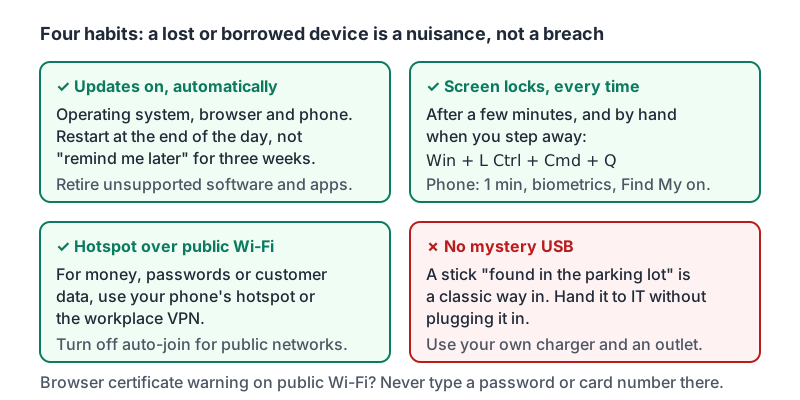
The four habits from this lesson on one card.
Shared and personal devices
- Do not log in to business accounts on a shared public computer (hotel lobby, print shop). If you must, use a private browsing window and sign out completely.
- If you use your personal phone for work email, apply the same rules: lock it, update it, and let your workplace remove work data if the phone is lost.
- Store work files in the company’s cloud (Drive, OneDrive, the POS system), not only on one laptop’s hard drive. A stolen laptop should be a nuisance, not a disaster.
Try it now
On the device you are holding, check three things: that automatic updates are on, that the screen locks within a few minutes, and that auto-join is off for any public network you have used. Fix whichever is not set. It takes about two minutes.
Remember: updates on, screen locked, hotspot over public Wi-Fi, and no mystery USB. A lost or borrowed device should be a nuisance, never a breach.
Checking your progress…