Social engineering by phone and text
A caller who sounds official, knows your name and creates a deadline is running a script. Learn the script, the three things you never give out, and the one move that ends every version.
It is a script, and you can learn it
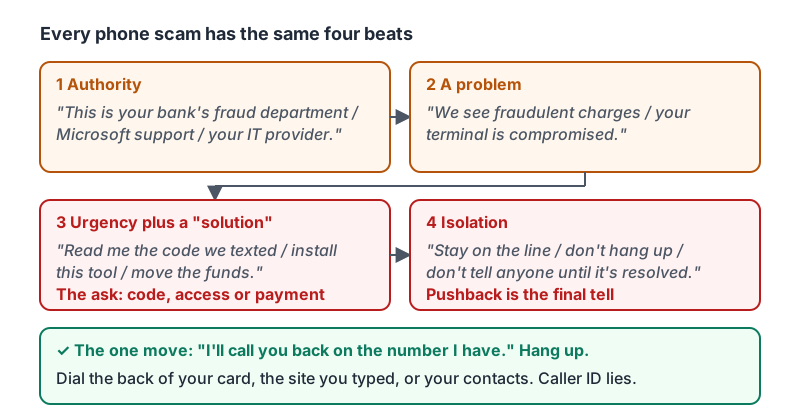
Phone scams work because they follow a reliable pattern, and because talking to a person feels different from reading an email. The caller is friendly, knowledgeable and in a hurry. Every version has the same four beats:
- Authority: “This is your bank’s fraud department / your card processor / Microsoft support / the IRS / your IT provider.”
- A problem: “We see fraudulent charges / your terminal is compromised / your account will be suspended / your package is held.”
- Urgency plus a solution: “To stop it I just need you to read me the code we texted / install this tool / move the funds to a safe account / pay the small fee.”
- Isolation: “Stay on the line / don’t hang up / don’t tell anyone until it’s resolved.”
Once you can hear the beats, the call stops feeling like an emergency and starts sounding like a performance.
The script, with the lines you will actually hear.
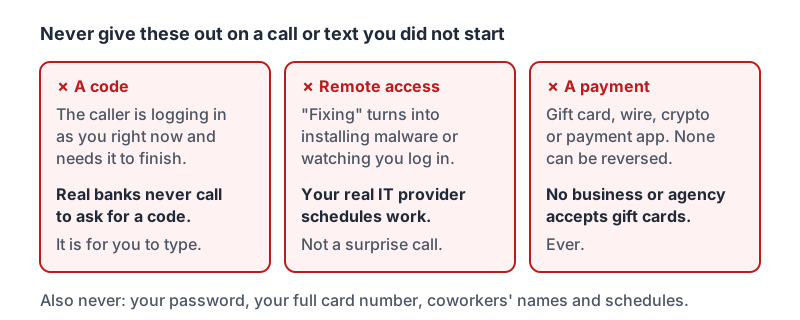
The three things you never give out on a call you did not start
| Never give out | Why | What a real organization does |
|---|---|---|
| A code texted or emailed to you | The caller is logging in as you right now and needs the code to finish | Banks and tech companies never call to ask for a code. The code is for you to type, not to read aloud. |
| Remote access to your computer | “Fixing” turns into installing malware or watching you log in to your bank | Your actual IT provider schedules work through a known contact, not a surprise call |
| A payment by gift card, wire, crypto or payment app | These cannot be reversed | No business, agency or utility accepts gift cards. Ever. |
Add to the list: your password (nobody legitimate asks), your full card number to a caller, and your coworkers’ names and schedules to a stranger.
The three things, as cards you can picture mid-call.
Caller ID lies
The number on your screen can be anything the caller wants. A call can show your bank’s real number, your own company’s number, or a local area code. Caller ID is not verification. Neither is the caller knowing your name, your address, the last four digits of your card or the name of your manager. All of that is for sale or on your website.
The one move: hang up and call back
Every phone scam dies the same way. Say: “I’ll call you back on the number I have.” Then hang up and dial the number on the back of your card, on the company’s website you typed yourself, or in your contacts. Do not use a number the caller gives you. Do not call back the number that called you.
A real bank, vendor or IT provider is fine with this. Scammers will push: “If you hang up the fraud will go through.” That pushback is the final tell.
The FTC’s three-minute video walks through a tech-support call from the first “we’ve detected a problem” to the request for remote access.
Text messages
Texts carry the same script with fewer words: package held, toll unpaid, bank alert, “Hi it’s your manager, I got a new number.” Treat a text like an email:
- Do not tap the link. Open the app or site yourself.
- Do not reply, even to say STOP, to a message you did not expect; it confirms your number is live.
- A manager with a “new number” asking for anything gets a call on the old number.
- Report the text with your phone’s Report Junk option or by forwarding it to 7726 (SPAM) on most US carriers, then delete it.
Sorting what you hear
| The call or text | Response |
|---|---|
| A customer confirming their appointment | Carry on. Nothing is being asked of you that costs anything. |
| Your supplier calling from a new number saying their billing contact changed | Hang up, call the number in your records, verify before changing anything |
| “Bank fraud team” asking you to read back the code they texted | Stop, hang up, report to your manager. Never share a code. |
| “Your IT provider” asking to install a remote tool for a problem you did not report | Stop, hang up, call your real IT contact on their known number, report |
| Delivery text asking for a small redelivery fee by card | Stop, do not tap, report the text |
| Your manager texting from their usual number asking you to call | Carry on, call them |
The rule behind the table: anything that asks for a code, access or a payment on a contact you did not start is a stop. Anything that changes who or where you pay is a verify-first.
If you already gave something
Codes and remote access are time-sensitive. If you realize mid-call or just after:
- Hang up. Turn off the computer’s Wi-Fi if you gave remote access.
- Call your bank or change the password for the account the code belonged to, from a device you trust.
- Tell your manager or IT right away. Lesson 8 covers exactly what to say.
Scammers count on embarrassment to keep people quiet. Reporting in the first ten minutes is what turns a loss into a near miss.
Try it now
Pick the three phone numbers you would need in an emergency: your bank’s fraud line (from the back of the card), your real IT contact, and your manager. Save them in your contacts now. The next time a caller gives you a number to call back, you will have the real one ready.
Remember: authority, problem, urgency, isolation: that is the script. Never give a code, remote access or a payment on a call you did not start. Hang up and call back on a number you already had.
Checking your progress…