Spoofing and look-alike domains
The display name is not the sender. Learn to find the real address in three taps.
The display name lies
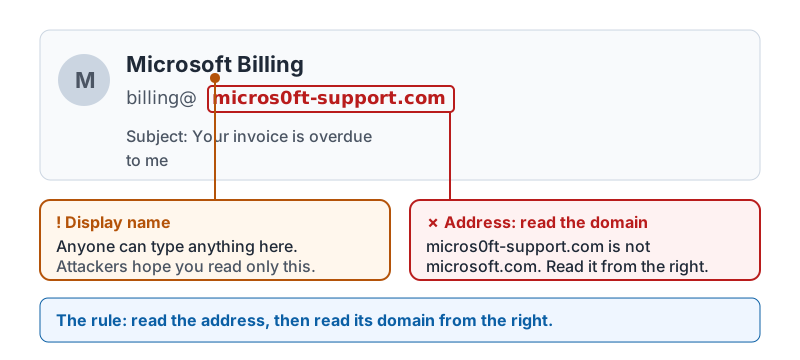
Every email has two sender fields: the display name (“Microsoft Billing”) and the address (billing@micros0ft-support.com). Anyone can type anything into the display name. Attackers count on you reading only the name, especially on a phone where the address is hidden by default.
The skill in this lesson is simple: always read the address, then read the domain in the address.
Here is what the two fields look like side by side, and which one to trust.
Reading a domain from the right
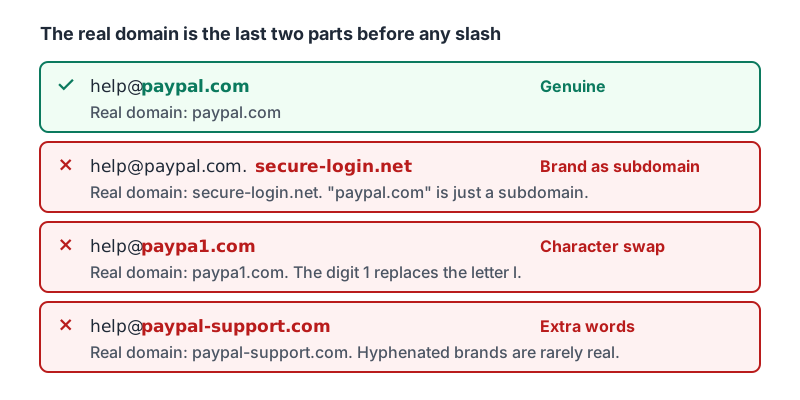
The domain is everything after the @. Read it from the right-hand side:
| Address | Real domain | Verdict |
|---|---|---|
help@paypal.com |
paypal.com | Genuine PayPal domain |
help@paypal.com.secure-login.net |
secure-login.net | Look-alike. “paypal.com” is just a subdomain name |
help@paypa1.com |
paypa1.com | Look-alike. Digit 1 replaces the letter l |
help@paypal-support.com |
paypal-support.com | Look-alike. Hyphenated brand names are rarely real |
Three common tricks:
- Character swaps:
rnform(microsrnoft),0foro,1forl, Cyrillic letters that look identical. - Brand as a subdomain:
yourbank.com.verify-account.co. The real domain is the last two parts. - Extra words:
-support,-billing,-secure,-hr.
The same four addresses from the table, with the real domain picked out in each one.
Reply-to is a second place to look
Some messages come from a real address but set a different Reply-To. A note “from” your boss with a Reply-To at a Gmail address is a classic business email compromise setup. Expand the message headers and check both.
What to do when the domain is wrong
Do not reply, do not click, do not call any number in the message. Use the report button (lesson 5 covers reporting step by step). If the message claims to be from a coworker or vendor, contact them through a channel you already trust: the phone number in your contacts, not the one in the email.
CISA’s one-minute public-service video puts the same habit to music: recognize, report, delete.
Remember: a familiar name plus an unfamiliar domain is the single most common sign of a phishing message. Checking takes three seconds.
Checking your progress…