Lab: summarise a Drive folder with NotebookLM and cite each point
Put the course to work. Load a folder into NotebookLM, get a cited summary, then find the point whose citation does not say what the summary claims.
The job
Your manager asks: “There’s a folder in Drive with everything about the Maple Street lease. Give me a one-page summary by lunch, and I want to know where each point comes from.” You will use NotebookLM, and then you will catch the one point whose citation does not hold up. The assessment at the end of this course gives you a summary of this kind to critique.
If NotebookLM is new to you, this walkthrough shows sources being added and citations opened before you start:
The folder
Imagine the Maple Street folder holds four documents:
- Lease_draft_v2.pdf: 5-year term, 3,800 per month, rent review in year 3 “in line with market rates”, tenant responsible for interior repairs.
- Landlord_email_thread.pdf: landlord writes “we would be open to discussing a break clause at year 3” and “parking for two vehicles is included”.
- Survey_report.pdf: roof “serviceable but will likely need replacement within 5 to 7 years”; electrical “compliant”.
- Lease_draft_v1.pdf: an earlier draft at 4,100 per month with no rent review clause.
Notice the traps: two drafts with different rents, a break clause that was only “open to discussing”, and a roof that needs work on a timescale that matters for a 5-year lease.
Step 1: curate the sources
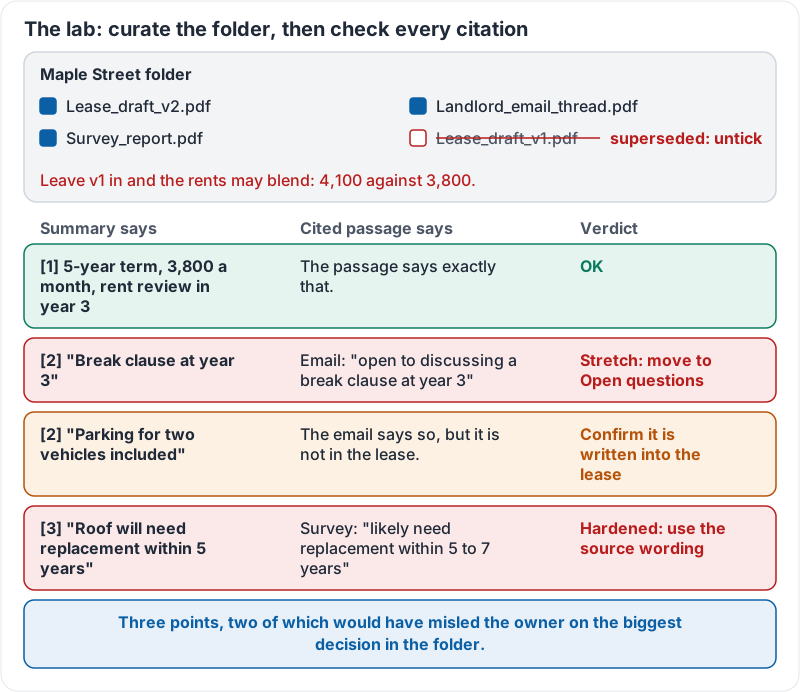
In NotebookLM, create a notebook and add the folder’s files from Drive. Then look at the source list. The v1 draft is superseded. Untick or remove it, or your summary may blend two rents. This step prevents more wrong answers than any prompt.
Step 2: brief NotebookLM
“Produce a one-page summary for the owner of a small business deciding whether to sign this lease. Sections: Key terms, Costs, Our obligations, Risks, Open questions. Every point must carry a citation. Where the sources only discuss or propose something rather than agree it, say so.”
Step 3: check the citations
Suppose the summary includes:
Key terms. 5-year term at 3,800 per month [1]. Break clause at year 3 [2]. Parking for two vehicles included [2].
Risks. Roof will need replacement within 5 years [3]. Rent review in year 3 in line with market rates [1].
Click each citation.
- [1] 3,800, 5 years, rent review: the passage says exactly that. Good.
- [2] break clause: the passage says “open to discussing a break clause”. The summary says there is one. That is the stretch. It belongs under Open questions as “landlord open to discussing; not in the draft lease”.
- [2] parking: the passage says parking is included. Good. But it is in an email, not the lease. Add “confirm it is written into the lease” under Open questions.
- [3] roof within 5 years: the passage says “likely need replacement within 5 to 7 years”. The summary hardened “likely, 5 to 7” into “will, within 5”. Use the source’s wording.
Three points, two of which would have misled the owner on the biggest decision in the folder.
The folder and the four checks together:
Step 4: fix with one follow-up
“Corrections: the break clause is only something the landlord is open to discussing, move it to Open questions with that wording. Parking is in the email, not the lease; add a question to confirm it is in the lease. The roof passage says likely within 5 to 7 years; use that wording. Then list any other statement in your summary that is stronger than its cited passage.”
Try it now
Pick a real folder of three to five related documents in your Drive. Load it into NotebookLM on your Workspace account, remove any superseded versions, ask for a cited summary with an Open questions section, and click every citation under Key terms and Risks. Count how many you have to soften.
Remember: curate the sources first, ask for citations and for proposals to be marked as proposals, then click every citation that matters and compare the summary’s words with the passage’s words.
Checking your progress…