Projects, files and memory
Stop re-explaining your business every morning. Put standing instructions and reference files in a Project and let memory carry the rest.
The repeat-yourself problem
If you use Claude for the same kind of work each week, you will find yourself typing the same background every time: who you are, what your company does, how you like things written. A Project fixes that. It is a folder that holds standing instructions and files, and every chat inside it starts already knowing them.
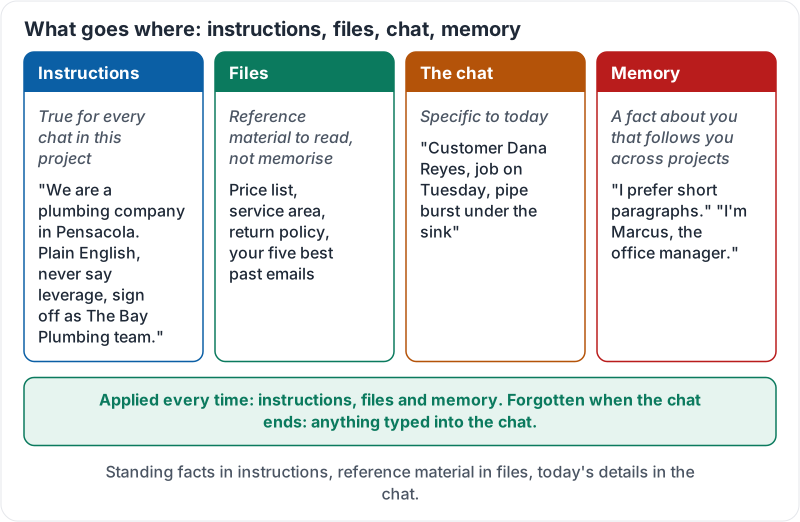
What goes where
| Put it in… | When | Examples |
|---|---|---|
| Project instructions | It is true for every chat in this project | “We are a plumbing company in Pensacola. Always write in plain English, never use the word ‘leverage’, sign off as ‘The Bay Plumbing team’.” |
| Project files | It is reference material Claude should read, not remember by heart | Price list, service area as text, return policy, your five best past emails |
| The chat itself | It is specific to today | “Customer Dana Reyes, job on Tuesday, pipe burst under the sink” |
| Memory | A fact about you that should follow you across projects | “I prefer short paragraphs.” “My name is Marcus and I’m the office manager.” |
Getting this right makes a big difference. Instructions that live in the right place are applied every time. Instructions typed in a chat are forgotten the moment the chat ends.
The four homes for information, and what lasts:
Working with files
You can upload documents, spreadsheets, PDFs and images. A few rules of thumb:
- Upload the source, not a description of it. Claude reads the actual price list far more accurately than your summary of it.
- Keep files current. An out-of-date price list in a Project will confidently produce out-of-date quotes. Put a date in the file name.
- Check what the file contains before you upload. A customer list with phone numbers is personal data. Lesson 7 covers what must be removed first.
- Ask Claude to quote the file. “Which line of the policy says that?” is a fast way to catch a made-up answer.
Memory: helpful and worth managing
Memory lets Claude carry facts between conversations, such as your role, your preferences and recurring context, so you do not repeat them. It is useful, and it needs light housekeeping:
- Review what has been remembered every month or two. Delete anything stale or anything about other people.
- Remember that memory belongs to the account. On a shared or personal account that may matter.
- If you want a one-off chat that leaves no trace in memory, use the option for a temporary chat.
Anthropic’s own walkthrough shows a project being created, instructions added and files uploaded:
A worked example
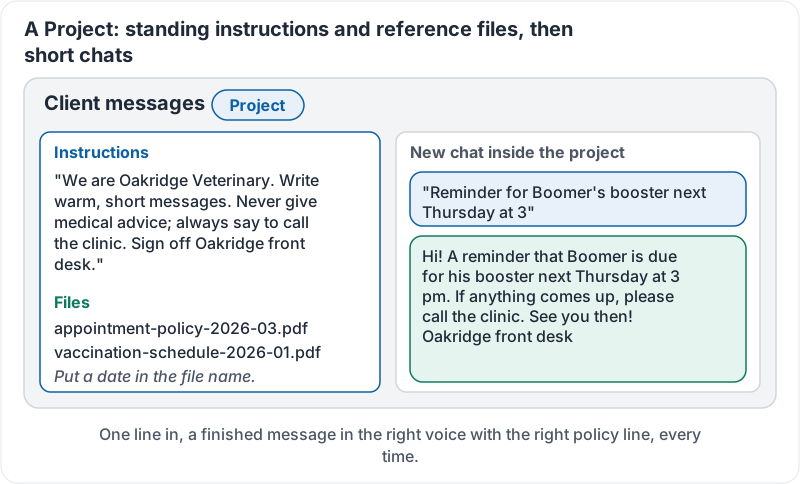
Lena runs the front desk at a vet clinic. She made one Project called “Client messages” with these instructions: “We are Oakridge Veterinary. Write warm, short messages. Never give medical advice; always say to call the clinic. Sign off ‘Oakridge front desk’.” She uploaded the clinic’s appointment policy and vaccination schedule.
Now when she types “Reminder for Boomer’s booster next Thursday at 3”, she gets a finished message in the right voice, with the right policy line, every time.
Lena’s project, simplified:
Try it now
Create one Project for the kind of work you do most. Write three sentences of instructions and upload one reference file. Start a chat inside it and give a one-line request you would normally have to explain at length.
Remember: standing facts go in Project instructions, reference material goes in files, today’s details go in the chat. Review memory every couple of months.
Checking your progress…