AI safety and judgment, part 1: what never to paste
Some information must never go into an AI chat, some needs the names removed first, and most is fine. Learn the three buckets.
The three buckets
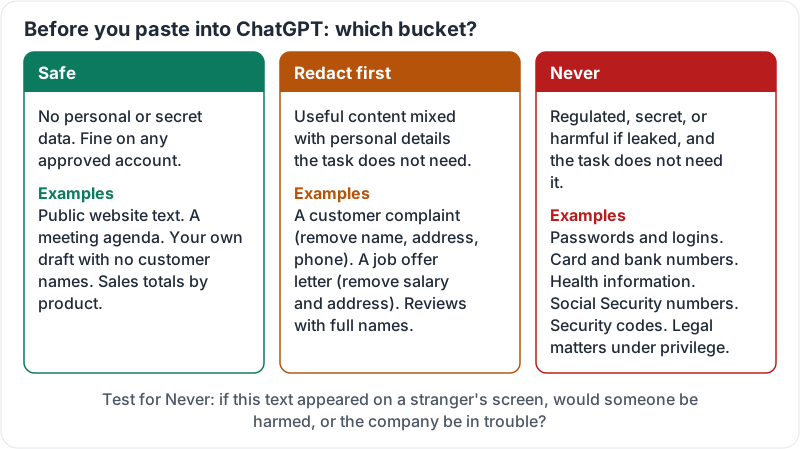
Everything you are about to paste into ChatGPT falls into one of three buckets.
| Bucket | Meaning | Examples |
|---|---|---|
| Safe | No personal or secret data. Fine to paste on any approved account | Public website text, a meeting agenda, your own draft with no customer names, sales totals by product |
| Redact first | Useful content mixed with personal details the task does not need | A customer complaint (remove name, address, phone), a job offer letter (remove salary and address), reviews with full names |
| Never | Regulated, secret, or harmful if leaked, and the task does not need it | Passwords and logins, card or bank numbers, health information, Social Security numbers, security codes, legal matters under privilege |
The test for “never”: if this text appeared on a stranger’s screen, would someone be harmed, or would the company be in trouble with a regulator or a customer? If yes, it does not go in.
The three buckets with examples:
Personal information: redact first
Most work involves people, and ChatGPT can help with it. It almost never needs to know who. Swap names for roles (“the customer”, “Employee A”), remove phone numbers, emails and addresses, and strip account numbers. The answer is just as good, and you put the names back afterwards.
Redaction habits:
- Paste into a notes app first, find-and-replace the name, then copy into ChatGPT.
- Ask what ChatGPT actually needs. Often two paragraphs, not the whole thread.
- On a phone, read the paste once before sending. Signatures and quoted replies carry a lot of personal detail.
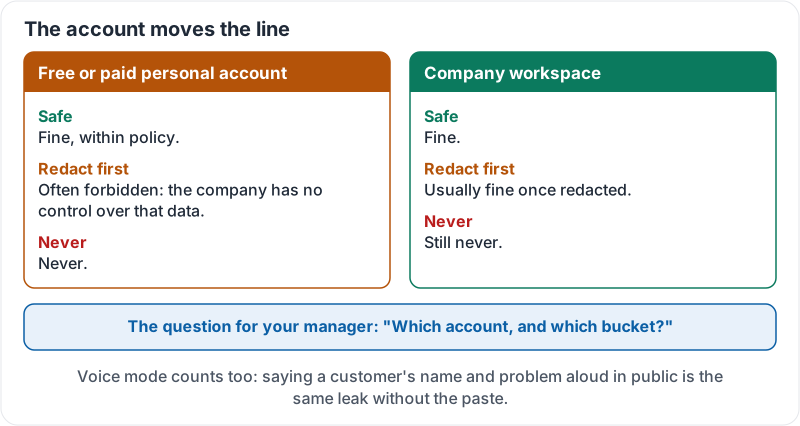
- Remember voice mode: saying a customer’s name and problem out loud in a public place is the same leak without the paste.
Passwords, payment and health: never
Three categories stay out on every plan, personal or workspace, unless your company has set up an explicitly approved process:
- Credentials: passwords, PINs, API keys, Wi-Fi codes, door codes, admin logins. A chat is not a password manager.
- Payment data: card numbers, bank account and routing numbers, CVV codes, full statements.
- Health data: diagnoses, doctor’s notes, medications, anything about a named person’s health.
If a task seems to need one of these, the task is wrong, not the rule. A note to payroll about an absence does not need the diagnosis. Setup instructions for a new hire do not need the real password.
The account moves the line
Lesson 1 covered personal versus workspace accounts. The buckets shift with the account:
- On a free or paid personal account, even “redact first” content may be forbidden by your company policy, because the company has no control over it.
- On the company workspace, redacted customer content is usually fine, and “never” still means never.
When in doubt, the question for your manager is: “Which account, and which bucket?”
How the buckets shift between accounts:
Try it now
Open your last five ChatGPT chats. Decide which bucket each paste belonged in. If anything landed in “redact first” or “never”, delete the chat and note what you would do differently next time.
Remember: safe, redact first, never. Passwords, payment details and health information are always never. Names and contact details come out before the paste, and before you say them out loud.
Checking your progress…