Verifying answers
A confident answer and a correct answer look identical. A two-minute check against the source finds the difference.
It goes out under your name
Whatever ChatGPT drafts, you send. The customer does not know an AI was involved and does not care. If the price is wrong or the promise was never made, that is your mistake.
Checking is quick once you know where mistakes hide.
Where mistakes hide
| Error type | What it looks like | How to catch it |
|---|---|---|
| Wrong specific | A date, price, quantity or name slightly off | Put the source next to the draft and check each one |
| Unsupported claim | A statement that sounds like it came from the document but is not in it (“the report recommends…”) | Ask “which page says that?” If it cannot point, cut or verify |
| Invented detail | A policy, feature, fee or person that does not exist | Search the source for it. Not there, not real |
| Missing item | The email had four questions; the reply answers three | Count the asks and tick them off |
| Wrong arithmetic | Totals and percentages that do not add up | Recompute one figure yourself |
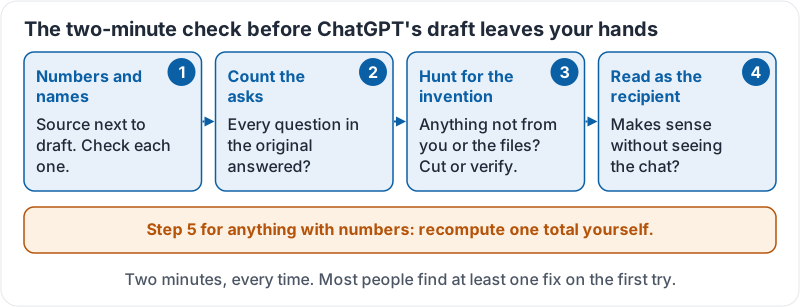
The two-minute check
Do this on anything that goes to another person:
- Numbers and names. Source next to draft. Check each one.
- Count the asks. Are all the questions in the original answered?
- Hunt for the invention. Any sentence that says something you did not provide and that is not in the files? Cut it or verify it.
- Read as the recipient. Does it make sense to someone who did not see the chat?
For anything with numbers, add a fifth step: recompute one total yourself.
The check as a card you can keep next to your screen:
Make ChatGPT help you check
Ask directly:
- “List every number and date in your draft and where each one came from.”
- “Which statements in your summary are not directly supported by the document?”
- “What did the customer ask that your reply does not address?”
This points you at the places to look. It does not replace looking.
Unsupported claims from documents
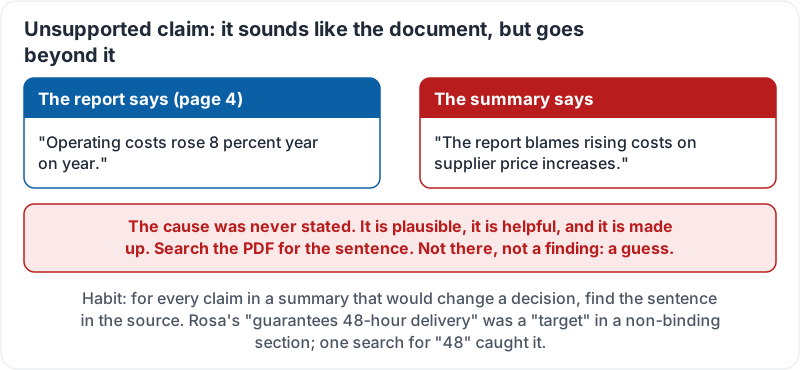
When ChatGPT summarises a PDF or report, the most common error is a claim that sounds like the document but goes beyond it. The report says “costs rose 8 percent”; the summary says “the report blames costs on supplier price increases”. That cause was never stated. It is plausible, it is helpful, and it is made up.
Habit: for every claim in a summary that would change a decision, find the sentence in the source. If you cannot, it is not a finding, it is a guess.
What an unsupported claim looks like next to its source:
A worked example
Rosa asks ChatGPT to summarise a 12-page supplier proposal. The summary says the supplier “guarantees 48-hour delivery”. She searches the PDF for “48”. It appears once, as a “target” in a non-binding section. She changes the brief to say “targets 48-hour delivery, not guaranteed” and saves her company from building a promise to customers on a sentence that was never there.
Try it now
Take any recent AI summary or draft and run the two-minute check against its source. Count your fixes. Then ask ChatGPT “which statements in your summary are not directly supported by the document?” and see whether it finds the same ones.
Remember: numbers and names first, count the asks, hunt for the invention, recompute one total, and for every claim that matters, find the sentence in the source.
Checking your progress…