Data entry and formats
One row per record, one kind of value per column, a header row that stays put. Everything else in this course depends on it.
A sheet is a table, not a page
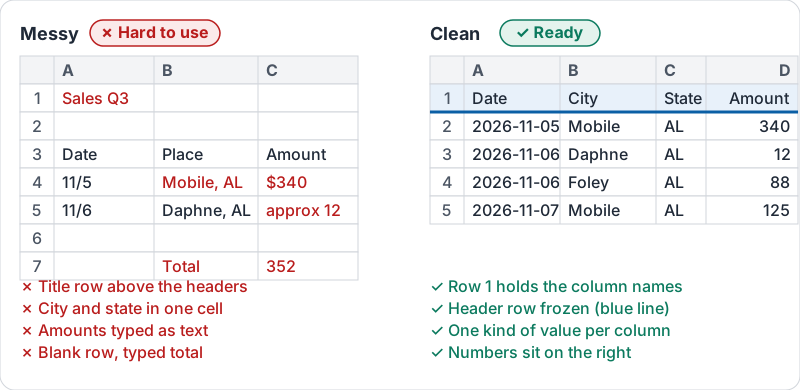
Most spreadsheet pain comes from treating a sheet like a piece of paper: a title across the top, blank rows for spacing, totals typed under the numbers, two facts squeezed into one cell. Sorting, filtering, formulas, pivot tables and Gemini all expect a plain table instead:
- Row 1 holds the column names. Nothing above it.
- Every row below is one record: one sale, one customer, one shift.
- Every column holds one kind of value: a date, a number, a name, a yes or no.
- No blank rows or columns inside the data, no merged cells, no totals mixed in with the records.
| Messy | Clean |
|---|---|
| “Mobile, AL” in one cell | City in one column, State in another |
| “Ana Ruiz - VIP” | Customer in one column, Tier in another |
| A total row typed after row 40 | Totals on a separate sheet or in a pivot table |
| Blank row between months | No blank rows; a Month column instead |
The same data both ways.
Numbers must be numbers
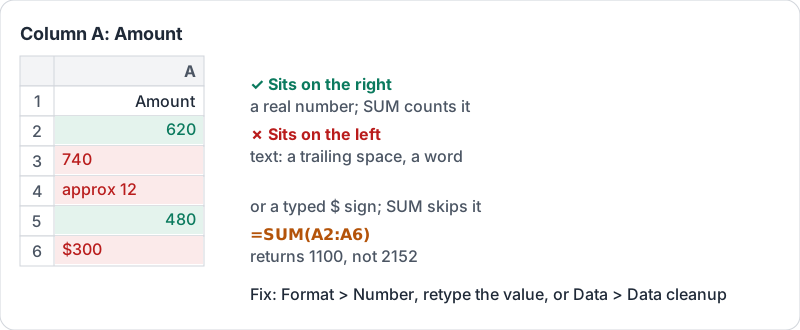
Sheets treats a cell as a number only if it contains just digits (and a decimal point or minus). “340 dollars”, “approx 12” and a number typed with a stray space are text, and SUM quietly skips them. A quick test: numbers sit on the right of a cell by default and text sits on the left. A column with values on both sides has a problem.
The alignment test in practice.
Dates work the same way. “11/5/2026” typed into a column formatted as a date becomes a real date you can sort and group by month. “Nov 5th” and “next Tuesday” are text.
Formats are a display choice
Formatting a column as currency, percent or a date does not change the value; it changes how it is shown. So pick the format once for the whole column and let it do the work:
| Column holds | Format | Shows |
|---|---|---|
| Money | Currency | 1,250.00 with the currency sign |
| A share | Percent | 0.18 as 18% |
| A date | Date | 2026-11-05 or 11/5/2026, consistently |
| Codes like ZIP or phone | Plain text | Keeps a leading zero |
Freeze the header row
When you scroll down 200 rows, the column names disappear unless the header row is frozen. Freeze row 1 in every sheet with data. Freeze the first column too if the record names are there.
Try it now
Open a sheet you use. Check row 1 is only column names and freeze it. Find one column with mixed text and numbers (look for values on both the left and right of their cells) and fix the text ones so they are real numbers.
Remember: header in row 1, one record per row, one kind of value per column, header frozen. Fix that first and every other tool starts working.
Checking your progress…