Finding files fast
Search reads inside files. Add a type, an owner or a date and most searches come back with one result.
Search reads the contents
Drive search looks inside documents, spreadsheets, PDFs and even the text in images. So search for words you know are in the file, not just what you think it is called. “walkthrough checklist Harbor” finds the file even if it is named “Untitled document”.
Operators that narrow it down
Type these straight into the search box, alone or combined with words.
| Operator | Example | Finds |
|---|---|---|
type: |
type:spreadsheet budget |
Only Sheets files about budget (also type:pdf, type:document, type:folder, type:image) |
owner: |
owner:maria@yourcompany.com proposal |
Files Maria owns |
owner:me |
owner:me |
Everything you own |
before: and after: |
after:2026-10-01 invoice |
Modified after 1 October 2026 (dates are YYYY-MM-DD) |
"exact phrase" |
"final walkthrough" |
Those words together, in that order |
title: |
title:onboarding |
The word in the file name only |
is:starred |
is:starred |
Files you starred |
is:trashed |
is:trashed commissions |
Things in the bin, for rescue |
to: |
to:tom@yourcompany.com |
Files you shared with Tom |
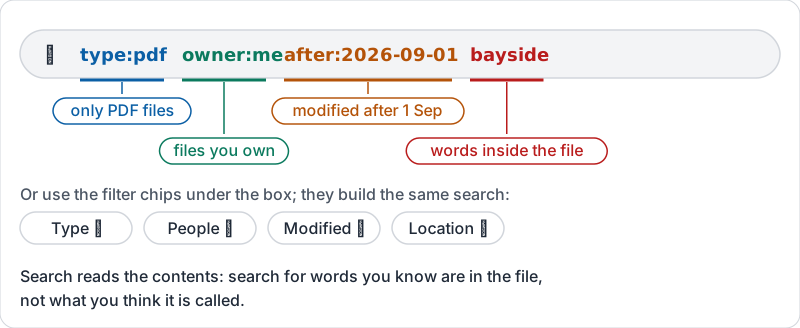
Combine freely: type:pdf owner:me after:2026-09-01 bayside.
That combined search, labelled.
Filters do the same with buttons
If you do not want to remember operators, the filter chips under the search box (Type, People, Modified, Location) build the same search. On a phone, the filter icon beside the search box does the same.
Rescuing a deleted file
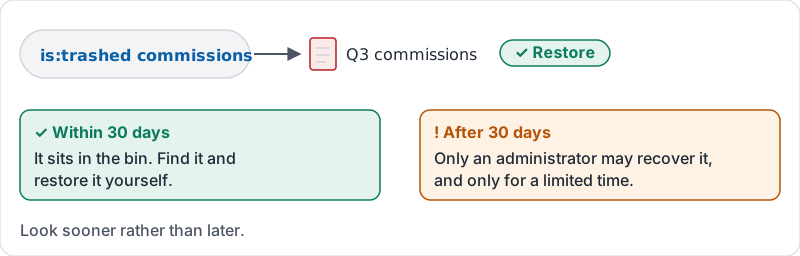
Deleted files sit in the bin for 30 days. is:trashed plus a word finds it; restore it from there. After 30 days, only an administrator may be able to recover it, and only for a limited time, so look sooner rather than later.
Rescuing a deleted file, and the 30-day line.
Save a search you run every week
A search like “invoices Maria owns from this month” can be run from the Advanced search panel each time, but it is quicker to star the folder or add a shortcut (lesson 2) when you find yourself searching for the same place repeatedly. Search is for finding; folders are for returning.
Try it now
Find three things using only the search box: a spreadsheet a specific colleague owns, every PDF you own modified since the start of last month, and something in your bin. Write the three searches you used in your notes.
Remember: search the words inside the file, then add type, owner or date. If you keep searching for the same folder, star it.
Checking your progress…