Sharing roles: Viewer, Commenter, Editor
Give people the least access that lets them do their job. Most people need to read, a few need to comment, very few need to edit.
Three roles
When you share a file or folder with a person or a group, you pick a role.
| Role | Can | Cannot | Give it to |
|---|---|---|---|
| Viewer | Open, read, download (unless you turn that off) | Change anything, comment | Auditors, printers, anyone who just needs to read |
| Commenter | Everything a Viewer can, plus comment and suggest | Change the text or the file | Clients reviewing, proofreaders, approvers |
| Editor | Change the file, and by default share it further | Delete it (owner only) | People who do the work in the file |
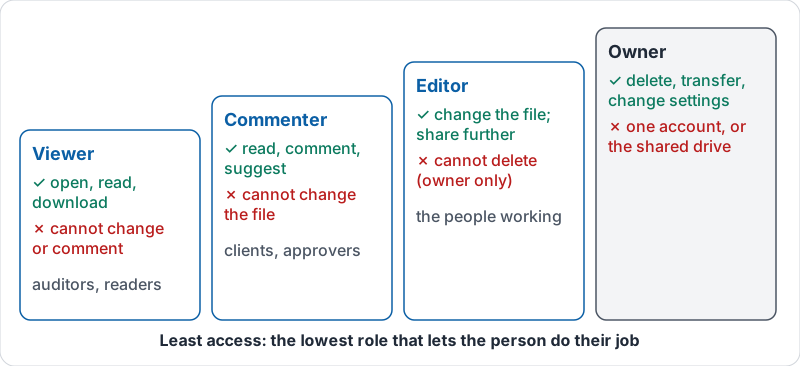
The owner is a fourth position: one account that can delete the file, transfer it and change these settings. On a shared drive, the drive is the owner.
The three roles and the owner, as a ladder.
Least access
The right role is the lowest one that lets the person do their job. A client reviewing a proposal needs Commenter, not Editor. A new hire reading the handbook needs Viewer. Someone updating the schedule every week needs Editor on the schedule, not on the whole Operations drive.
Two reasons this matters even among people you trust:
- Accidents. Editors delete a paragraph by accident, drag a folder somewhere odd, or overwrite a price. Viewers cannot.
- Account compromise. If a colleague’s password is stolen, the attacker gets their access. Fewer editors, less damage.
Share with groups, not people
Sharing “Operations folder” with twelve individual names means twelve edits every time someone joins or leaves. Share it once with a group (ops-team@yourcompany) and your administrator manages the group. Shared drive membership works the same way.
Folder sharing flows down
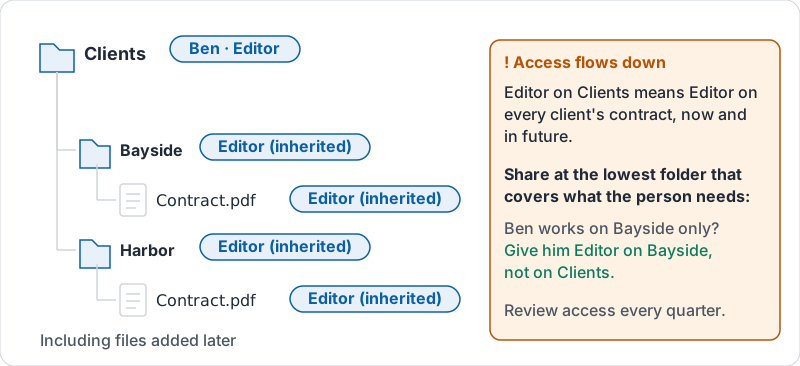
Access on a folder applies to everything inside it, including files added later. That is convenient and dangerous: an Editor on “Clients” is an Editor on every client’s contract. Share at the lowest folder that covers what the person needs.
How one share on a folder reaches every file below it.
Review and remove
Access should be reviewed, not just granted. Every quarter, open the sharing panel of the folders that matter and ask of each name: do they still need this? Remove former contractors, ex-employees’ personal addresses and vendors whose project has finished.
Try it now
Open the sharing panel of the folder your team uses most. For each entry, say out loud why that person needs that role. Downgrade anyone who only reads to Viewer and remove anyone who no longer works with you.
Remember: Viewer to read, Commenter to review, Editor to work. Start low, raise it only when someone actually needs more.
Checking your progress…