My Drive vs shared drives
Files in My Drive belong to a person. Files in a shared drive belong to the team. Put business files where the business owns them.
Who owns the file?
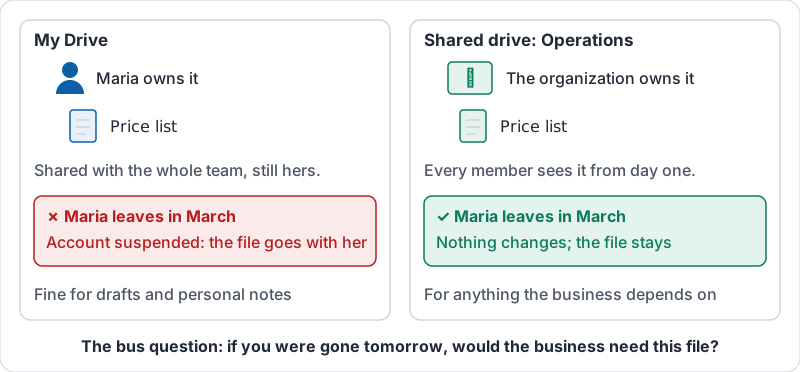
Every file in Drive has an owner. In My Drive, the owner is you. If your account is suspended or deleted, your files go with it unless someone transfers them first. The team can be locked out of the price list because the person who made it left in March.
A shared drive is owned by the organization. Files inside it belong to the drive, not to whoever uploaded them. People come and go; the files stay.
| My Drive | Shared drive | |
|---|---|---|
| Owner | One person | The organization |
| When that person leaves | Files are at risk unless transferred | Nothing changes |
| Who can see a new file | Only you, until you share it | Everyone who is a member of the drive |
| Sharing | File by file, folder by folder | Set once at the drive; per-file sharing still possible |
| Best for | Drafts, personal notes, your own copies | Anything the business depends on |
The difference the week someone leaves.
The simple rule
Ask: “If I were hit by a bus tomorrow, would the business need this file?” If yes, it belongs in a shared drive. Contracts, price lists, schedules, templates, customer lists, brand assets, procedures: shared drive. Your scratch notes, a half-written idea, a certificate from this training: My Drive is fine.
Sharing a My Drive folder with the whole team feels like the same thing. It is not. It is still your folder, and it still leaves with you.
How shared drives are organised
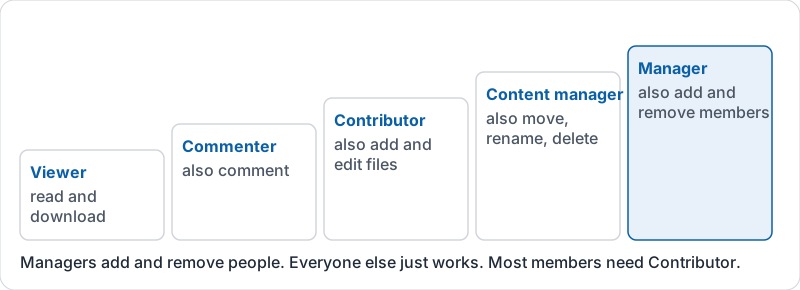
Most small businesses need only a few shared drives, one per team or area: Operations, Finance, Sales and Marketing, HR (restricted). Each has members with a role (Manager, Content manager, Contributor, Commenter, Viewer). Managers add and remove people; everyone else works.
Do not create a shared drive per project; you will have forty by next year. Projects are folders inside the team’s drive.
Shared drive member roles, each adding to the one before.
Moving files into a shared drive
You can move your own My Drive files into a shared drive, and ownership moves with them. Moving someone else’s file needs them to do it, or an administrator. Do it now for anything that matters, not during the week someone resigns.
Try it now
Open My Drive and look at the first ten files you own. For each, ask the bus question. Move anything the business needs into the right shared drive, and tell the team where it went.
Remember: My Drive is yours and leaves with you. If the business needs it, it lives in a shared drive.
Checking your progress…