Lab: revise a doc to match a brief
Put it together. Read a brief, review the document against it and propose the changes in suggesting mode with a reason for each.
The situation
A manager hands you a short document and a brief: “Make this fit on one page, add a heading for each section, and fix the link text.” They own the document. They want to see what you changed and approve it.
This is the everyday use of everything in this course: styles, headings, suggesting mode, comments, and a quick accessibility check before it goes out.
How to work through it
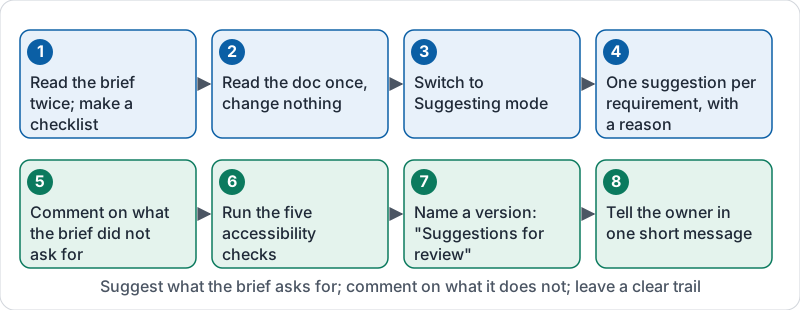
- Read the brief twice. List its requirements as a checklist. If a requirement is unclear, that is your first comment, not a guess.
- Read the document once without changing anything. Note where it misses each requirement.
- Switch to suggesting mode before you touch the text.
- Make one suggestion per requirement, in small pieces, and add a one-line reason that points back to the brief: “Brief: under 100 words.”
- Comment, do not change, anything the brief did not ask for but that looks wrong (a date, a price). The owner decides.
- Run the five accessibility checks (lesson 8). Suggest fixes for anything that fails.
- Name a version called “Suggestions for review” so the owner can compare before and after.
- Tell the owner what you did in one short message: how many suggestions, anything you were unsure about.
The eight steps at a glance.
What a good result looks like
| Weak | Strong |
|---|---|
| Edits made directly in editing mode | Every change is a suggestion the owner can accept or reject |
| One giant suggestion rewriting the page | Separate suggestions, each tied to a line of the brief |
| Changes with no explanation | Short reason on each suggestion |
| A price changed because it “looked wrong” | A comment asking the owner to confirm the price |
| “Click here” left in place | Link text names the destination |
What the assessment asks
In the lab item you will see a brief and the text of a short document. You will be asked to write, in two to four sentences, what you would change and why, as if you were writing the note to the owner. Name the specific problems (a missing heading, “click here”, a wrong date, too many words) and say you would make them as suggestions.
Try it now
Ask a colleague for a one-page document and a three-line brief. Do the eight steps above, in suggesting mode, in under fifteen minutes. Ask them afterwards whether the suggestions were easy to review.
Remember: the brief is the boss. Suggest what it asks for, comment on what it does not, and leave the owner a trail they can follow in two minutes.
Checking your progress…