Voice, browsing and agent features
Voice is for thinking out loud, browsing is for fresh facts with links, and agents act for you. The more a feature can change, the closer you watch it.
Voice: hands-free thinking
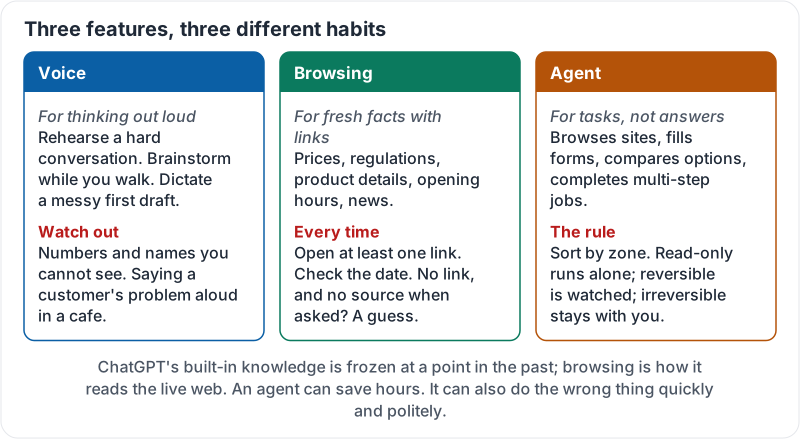
Voice mode lets you talk to ChatGPT and hear it talk back. It is good for:
- Rehearsing a difficult conversation on the drive in.
- Brainstorming while you stock shelves or walk between jobs.
- Dictating a messy first draft you will clean up later.
It is less good for anything with numbers or names you need to get exactly right, because you cannot see them. Switch to text to check. And remember where you are: a voice chat about a customer in a café is a privacy problem no setting can fix.
Browsing: fresh facts with links
ChatGPT’s built-in knowledge is frozen at a point in the past. When it browses, it searches the live web and answers with links to what it read.
Use browsing when the answer depends on something recent: prices, regulations, product details, opening hours, news. Then do two things every time:
- Open at least one link. Does the page actually say what ChatGPT said?
- Check the date. A 2022 page about fees is history, not fact.
If a number appears with no link, and asking “what is the source for that figure?” does not produce one, treat it as a guess.
Voice, browsing and agents each come with their own habit:
Agents: from answering to doing
An agent does not just answer. It takes actions: browsing sites, filling forms, comparing options, completing multi-step jobs, sometimes in a browser it controls itself. It can save hours. It can also do the wrong thing quickly and politely.
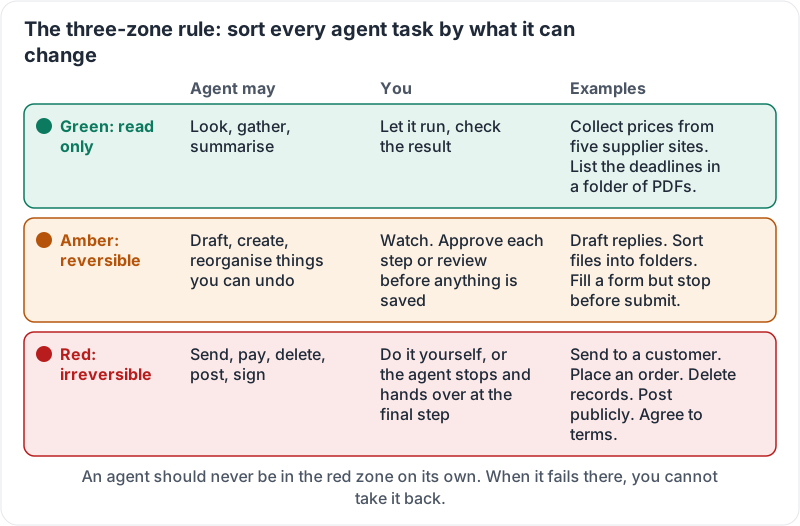
Sort every agent task by what it can change.
| Zone | What the agent may do | Your role | Examples |
|---|---|---|---|
| Green: read only | Look, gather, summarise | Let it run, check the result | Compare five suppliers’ prices into a table; find the deadlines in a set of PDFs |
| Amber: reversible | Draft or create things you can undo | Watch, approve steps, review before save | Draft replies; fill a form but stop before submit; build a spreadsheet |
| Red: irreversible or external | Send, pay, delete, post, sign, agree | Do the final step yourself | Email a customer; place an order; delete records; post publicly |
An agent should not be in the red zone alone. Not because it always fails, but because when it does you cannot take it back.
The three zones at a glance:
How agents go wrong
- Wrong target: perfect form, wrong customer record.
- Confident fill: a field it cannot find gets a plausible value instead of a question.
- Scope creep: asked to tidy one folder, it tidies three.
- Instructions on the page: websites can contain hidden text aimed at AI agents. Good agents resist this; none are perfect. Keep agents away from payments and passwords.
Briefing an agent
- Say what done looks like: “Draft replies to the three supplier emails. Do not send.”
- Set a boundary: “Only use the Invoices 2026 folder.”
- Stop before the irreversible step: “Fill the order form and stop. I will click submit.”
- Watch the first run of any new task. Earn trust before you grant it.
Two short clips from OpenAI. First, voice in everyday use:
Then the agent, acting rather than answering. As you watch, sort each step into a zone:
Try it now
Write down three tasks you would like ChatGPT to do for you this month. Put each in a zone: green, amber or red. For any red task, rewrite it so the agent stops at the final step and hands over to you.
Remember: voice for thinking, browsing for fresh facts you then click to check, agents for tasks sorted by zone. Read-only runs alone, reversible gets watched, irreversible stays with a person.
Checking your progress…